Science and Technology:

Software engineering, Agile,

UML, MODELING and more . . .

Showing posts with label Requirements. Show all posts

Tuesday, February 10, 2015

Answering to impossible requirements


Be interested in finding the best way, not in having your own way.

Creative Thinking

One day I was waiting for a meeting and there was a poster in the room. this poster was about “Creativity”, "Creative inspiration", "Creative activities" or "Creative Activities". The poster showed a room where two strings hang from the ceiling and a person was placed in the middle of the room. The two strings were far enough so one person cannot hold one string and then take the other one  without releasing the first one.

The the goal of the exercise was to tie the two strings together.

Many years later I’ve read that this was an experiment created in 1931 by a psychologist from the Michigan University named “Raymond Frederick Maier” (1900 – 1977). In his book “Problem solving and creativity in individuals and groups” [Brooks/Cole Pub. Co., 1970] he describes this scene and gives an analysis of the possible issues.

Problem and Solutions

In the poster that I’ve seen, there were some other elements. For example, some tools are available in the room:
  • A chair
  • A pair of scissors
  • A heavy piece of metal
  • A bottle of water

First solutions

In the beginning, the person in the middle of the room could imagine solving the issue by using some "naive" methods:
  • Try to stretch his body and make it more “elastic”
  • Try some odd postures
  • Force his body to extend itself from one string to the other


This is because the person is limiting himself and doesn't take into account his environment. It is evident that the person should use the tools around him. For example:
  • Take one string in one hand and try to use the chair as a "hook"
  • Take on string in one hand and climb over the chair to try take the other one


In a more elaborated solution, he can think about some extravagant solutions
  • Wet the strings in order to change their elasticity
  • Hang the heavy metal piece from the string in order to elongate it and then repeat the process with the second string

These kind of solutions clearly show that the person is limiting himself by some restrictions that hasn't been mentioned and which may not even exist.

Breaking the rules!

In order to give an issue to some impossible problems, some rules shall be respected while some others can be broken. if no special restrictions have been give, it is a good idea to try to break all of them. Thus, the person in the room could try to simply cut one of the ropes off.


Imaginative solution

Of course, with some more imagination, the person could use a medium-weight object hang from one of the strings in order to swing it while taking the other and using the chair to gain some distance.


Ask an Expert

In a previous post named “The gap between Customer's explanation and his real needs” I've shown a very funny video  clearly schematizing how Customer's requirements are often unclear, contradictory, fuzzy and even crazy or impossible to implement.

At the end of the video, the Expert accepts the project, mostly because “he is an expert” and that’s what everybody expects from an Expert.

But, in the real life, how an expert could have answered to these questions?

Lets take this video as example!

He was asked to draw seven lines, all of them strictly perpendicular between them. What limits him to do it? Geometry! This is because he is thinking about linear Euclidean geometry, but nobody enunciated this requirement's limitation. Thus we can think about breaking this rule. We can easily draw two perpendicular lines in a bi-dimensional space. We can also easily imagine three perpendicular lines in a three-dimensional space. So, let’s say to the customer that the lines will be drawn in a seven-dimensional space but only three of them will be visible!

The expert was also asked to draw the Red lines with Green ink. No more limitations were given. So let’s say to the customer that the lines will be drawn in green ink, but the user will need to use some special “chromatic glasses” converting green colors into red colors.

Fresh eyes

The point is not to be limited by imaginary constraints. Instead of that, to take a look to the problem with fresh eyes.

What distinguishes an expert?
A Free Mind and a tendency to Break Some Rules!


Do you think that anyone can be an Expert?
Do you know other expert's skills that should be mentioned?


Extra reading
* “The gap between Customer's explanation and his real needs
* http://cybersavoir.csdm.qc.ca/peremarquette/2012/03/15/tout-lmonde-a-son-gps/ (in French)
* http://en.wikipedia.org/wiki/Norman_Maier
Bibliographic information
QR code for Problem solving and creativity in individuals and groupsTitle: Problem solving and creativity in individuals and groups
Author: Norman Raymond Frederick Maier
Publisher: Brooks/Cole Pub. Co., 1970
Original from the University of Michigan
Digitized 30 Sep 2008
Length: 493 pages

Wednesday, January 28, 2015

The gap between Customer's explanation and his real needs


Have you ever heard about the gap between the Customer's requirements and the point of view of the project team's members?

All the people involved in a software project have heard about the gap between: 
  • Customer explanation
  • Project leader's understanding
  • Analyst's design
  • Developed code
  • Business description


And the unfortunately very common poor software results:
 Project documentation
  • Operation installation
  • Support


In my opinion, one of the most astonishing and even striking differences is between Customer's explanation and his real needs.


My work as Functional Analyst has shown me that very often, the customer doesn't know what he wants or, more precisely, he does not know how to explain it. It gives the opportunity to any unscrupulous marketing agent to sell him any kind of solution.


One of the tasks that I really like is the work with the customer and final users in order to help them representing (or even better, modelling) their needs. All this, in the form of graphical models, requirement specifications, user stories, storyboards, use cases, mock-ups, sketches, etc. This is a a very valuable work since it allows the customer to finely adapt his budget to target:
  • All of the "Must-have" requirements
  • Some "nice-to-have" requirements

We have also heard about these stories where a marketing guy sells something that cannot be developed. Moreover, with a ridiculous delay and price. Then, the dev-team shall deal with all those restrictions and try to do it in the assigned time, quality and budget. A have written a post on Answering to Impossible Requirements.

The following video illustrates some of these problems:
  • Customer doesn't know exactly what he wants
  • Customer requirements are
    • contradictory
    • fuzzy
    • impossible to implement
  •  Marketing agent pushes the expert guy to accept any requirement

        At the end of the sketch, everybody agrees on a "seven perpendicular red lines drown with green ink" project!


I really laugh at the "perpendicularity" question:
        - ....
        - Seven lines, all strictly perpendicular
        - To..... what?
        - eeuuhhh...... to........ everything!
           ....... among ........ themselves !
           I assume you know what perpendicular lines are like !
        - Of course he does! He is an expert!
        -  ...
        - Why are they blue?
        - Indeed, over it was that myself
        - I have a blue pen with me
        - This was just a demonst.....
        - That's the problem, the lines are blue, draw them with red ink
        - That wont solve the problem
        - How do you know before you've tried?
           Lets draw them in red ink then lets see...


Tuesday, November 1, 2011

Automatic requirements numbering


Some time ago I was working for Airbus as Product Leader Deputy.

Among all my duties, I was responsible for writing the high level requirement specification; link it to the stakeholders’ requirements and to the technical specification.

Quality constraints in Airbus are very strict concerning the traceability, the coverage and the impact analysis.

A correct link between all the documents allows us to evaluate the progress of our project, the remaining work and impact of evolutions or bug correction.

Fortunately, there are many tools allowing us to manage these issues.

Reqtify is a very useful software used in order to create, manage and visualize the relationships between artifacts in different documents, in other words, traceability. In a previous post I have explained the "Benefits of requirements traceability"; in that post I describe how to link all the documents into a coherent structure by using a tool called Reqtify.

However, this powerful traceability requires the specification document to be written by following strict naming rules so they can be correctly traced.

Indeed, non-unique or non-homogeneous requirements IDs prevent the traceability software to find a requirement.

Under these circumstances, an automatic numbering tool perfectly prevents human errors.

Such numbering tool shall allow the writer to call it in a very easy and non-intrusive way; i.e. no pop-up or any other kind of external windows.

Airbus provided a MS Word macro called “CARE.dot”. This macro provides an automatic requirement numbering. However, the code of this macro is private, then I decided to create my own macro for requirement numbering.

Word Macro for a Functional requirements template

The configuration of this macro is very simple and its utilization very comfortable.

Hereafter the code explained


Sub AutomaticReqNumbering()
'David GARDUNO
'24/08/2011
'This macro insert automatic requirements number based on document's properties
'Define a doc property "REQ-ID", for example CMPNY-PRJ-REQ-A-
'Define a doc property "REQ-Nmbr", for example 1
'The macro will generate requirement numbers as follows
'CMPNY-PRJ-REQ-A-001-1
'CMPNY-PRJ-REQ-A-003-1
'CMPNY-PRJ-REQ-A-004-1
'CMPNY-PRJ-REQ-A-005-1

'reqnb stores the value of the reqNbrProperty property
Dim reqnb As Integer
'reqID stores the value of the reqIDProperty property
Dim reqID As String
'reqNbrProperty stores the "REQ-Nmbr" document's property
Dim reqNbrProperty  As DocumentProperty
'reqIDProperty stores the "REQ-ID" document's property
Dim reqIDProperty  As DocumentProperty

    'get the "REQ-Nmbr" document's property
    Set reNbrProperty = ActiveDocument.CustomDocumentProperties("REQ-Nmbr")
    ' get the value of the reqNbrProperty property
    reqnb = reqNbrProperty.Value
    'get the value of "REQ-ID" document's property
    reqID = ActiveDocument.CustomDocumentProperties("REQ-ID")

    'go to the beginning of the line
    Selection.HomeKey Unit:=wdLine
    'type the reqID (for example CMPNY-PRJ-REQ-A-)
    Selection.TypeText reqID
    'start typing the ID number
    If reqnb < 10 Then
        'Type one 0
        Selection.TypeText "0"
    End If

    If reqnb < 100 Then
        type a second 0
Selection.TypeText "0"
    End If

    'Type the reference number
    Selection.TypeText reqnb
    'Type the version number
    Selection.TypeText "-1 "

    'Set the last blank space as bold = false
    Selection.Font.Bold = False
    Selection.MoveLeft Unit:=wdCharacter, Count:=1

    'Select the reference number
    Selection.HomeKey Unit:=wdLine, Extend:=wdExtend
    'Set the text as bold
    Selection.Font.Bold = True
    'Go to the begining of the line
    Selection.HomeKey Unit:=wdLine

    'increment the reference document's property
    reqNbrProperty.Value = reqnb + 1


End Sub


Sub AutomaticReferenceNbr()
'David GARDUNO
'24/08/2011
'This macro insert automatic reference number based on document's properties
'Define a doc property "REF-ID", for example CMPNY-PRJ-REF-A-
'Define a doc property "REF-Nmbr", for example 1
'The macro will generate reference numbers as follows
'CMPNY-PRJ-REF-A-001-1
'CMPNY-PRJ-REF-A-003-1
'CMPNY-PRJ-REF-A-004-1
'CMPNY-PRJ-REF-A-005-1

    'refnb stores the value of the refnbProperty property
    Dim refnb As Integer
    'refID stores the value of the refIDProperty property
    Dim refID As String
    'refnbProperty stores the "REF-Nmbr" document's property
    Dim refnbProperty  As DocumentProperty
    'refIDProperty stores the "REF-ID" document's property
    Dim refIDProperty  As DocumentProperty

     'get the "REF-Nmbr" document's property
    Set refnbProperty = ActiveDocument.CustomDocumentProperties("REF-Nmbr")
    ' get the value of the refnbProperty property
    refnb = refnbProperty.Value
    'get the value of "REF-ID" document's property
    refID = ActiveDocument.CustomDocumentProperties("REF-ID")


    'go to the beginning of the line
    Selection.HomeKey Unit:=wdLine
     'type the refID (eg. CMPNY-PRJ-REF-A-)
    Selection.TypeText refID
    'start typing the ID number
    If refnb < 10 Then
        'Type one 0
        Selection.TypeText "0"
    End If

    If refnb < 100 Then
        'Type a second 0
        Selection.TypeText "0"
    End If

    'Type the reference number
    Selection.TypeText refnb
    'Type the version number
    Selection.TypeText "-1 "

    'Set the last blank space as bold = false
    Selection.Font.Bold = False
    Selection.MoveLeft Unit:=wdCharacter, Count:=1

    'Select the reference number
    Selection.HomeKey Unit:=wdLine, Extend:=wdExtend
    'Set the text as bold
    Selection.Font.Bold = True
    'Go to the begining of the line
    Selection.HomeKey Unit:=wdLine

    'increment the reference document's property
    refnbProperty.Value = refnb + 1


End Sub


I have also created a template in the form of a .dot MS-Word file.


The file is named "automatic numbering.dot" . You can download the template in Zip here  or Word format here.


How to add a macro to word 

In order to activate it in Word 2003:
  • Save the attached file
  • Open a word document
  • Menu: Outils > Modèles et compléments (Eng: Tools > Models and complements)
  • Tab "Modèles", click on "Ajouter" (Eng: Tab "Models", click on "Add"
  • Select the .dot file then accept
  • Define a doc properrty "REF-ID", for example "CMPNY-PRJ-REF-A-" (menu Fichier > proprietés > personalisation)(Eng: menu File > properties > personalisation)
  • Define a doc property "REF-Nmbr", for example 1
  • Define a doc property "REQ-ID", for example "CMPNY-PRJ-REQ-A-"
  • Define a doc property "REQ-Nmbr", for example 1

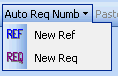
Observe that the .dot added a new menu "Auto Req Number"


In order to use the macro you need to put the prompt in the line concerning the ne menu, then select the "New req" or "New ref" options in the "Auto Req Number" menu


This macro will generate ID's as follows
  • CMPNY-PRJ-REF-A-001
  • CMPNY-PRJ-REF-A-002
  • CMPNY-PRJ-REF-A-003
  • CMPNY-PRJ-REF-A-004
  • CMPNY-PRJ-REQ-A-001
  • CMPNY-PRJ-REQ-A-002
  • CMPNY-PRJ-REQ-A-003
  • CMPNY-PRJ-REQ-A-004

How to easily access the macro in word

You can also create a shortkey

  • Menu: Outils -> Personalisation ->Commandes (Eng: menu Tools > Personalization > commands)
  • Click on "clavier" (Eng: keyboard)
  • In the window "categories" select "macro"
  • In the window "macros" select one of the numbering macros, for example "req numbering"
  • In the line "enregistrer dans" (Eng: "Save in") select your working document
  • In the line "nouvelle touche de raccourci" (Eng: "New shortkey") type your shortkey, for example Ctrl+shift+Q for requirements and Ctrl+shift+F for references

Observe that the .dot has also added a "Coller comme hyperlien" (Eng: "Paste as hyperlink") button in the toolbar.


This button will allow you to easily create links to your requirements. Fro example, there  are two requirements (007 and 010).

C264CT-BoardsConf-REQ-007 Blah blah blah

C264CT-BoardsConf-REQ-010 Blah blah blah

Now, you want to create a reference to requirement 010 in requirement 007.

  • Copy the entire requirement C264CT-BoardsConf-REQ-010, then go to requirement 007 and type "See ", then click on the button "Paste as a link". Your new requirement will look like

C264CT-BoardsConf-REQ-007 Blah blah blah. See C264CT-BoardsConf-REQ-010

Now, you can navigate within your document: Ctrl+click on the new link


Finally observe that two navigation buttons were also added by the .dot to the toolbar. These buttons allow you to easily go forward and backward your links as in any regular web page.


Enjoy and comment !


***Note. It seams that the “Paste as hyperlink” option is deactivated for some Word versions


Thursday, April 21, 2011

Communicating Systems with UML 2

Modeling and Analysis of Network Protocols


I am very happy to present my book issue of all the work that I have done during my PhD. It deals with the application of a modeling language to a very specific domain: Communication Systems. Some applications of this work can be seen in "Modeling Network Protocols With UML"


David Garduno Barrera, Consultant 

Michel Diaz, LAAS/CNRS, Toulouse, France 

ISBN: 9781848212992 
Publication Date: June 2011   Hardback   320 pp. 
See book description on Editor site: ISTE; John Wiley & Sons

David GARDUNO, PhD. He has worked as consultant for many aeronautical companies such as Airbus and Thalès Avionics. His main duties concerned system modeling and product leading. He has also worked as trainer on system modeling (SysML), Business Process Modeling (BPM), OO Analysis and Design for the European Commission and Astrium, amongst others. He currently works for an intrnational company on electrical systems.

Michel DIAZ, Director of Research at CNRS, editor of twelve books, and 200 publications, Silver Core of IFIP, Senior Member of IEEE, member New York Academy of Sciences, listed in the Who'sWho in Science and Engineering.

Most of the current bibliography on the subject is in the form of scientific papers available in very specialized scientific publications; therefore, they use a complex language and highly technical explanations.

The rest of the literature on the subject is either specialized on teaching UML or on presenting network mechanisms together with the layers of communications protocols.

On the contrary, this book exposes a set of practical examples which can be used either for teaching UML by using protocol examples or for teaching network protocols using UML, leading to a more understandable, and simulation-based approach.

This book gives a practical approach for modeling and analyzing communication protocols using UML 2. It shows how to describe and validate the main protocols issues (as synchronization problems, client-server interactions, layer organization and behavior, etc) in an easy and understandable way. For doing so, the book considers and presents the main traditional network examples (e.g., unidirectional flows, full-duplex communication, error recovering, alternating bit). Finally, it shows the outputs resulting from a few simulations of these UML models.


David GARDUNO

Monday, April 5, 2010

Is TDR suitable for a highly layered process?


I’m currently working on “Product assistance” for an aircraft constructor and my usual tasks are Requirements writing or update.

However, the specifications that I write are not used directly by the developers’ team. On the contrary, these high level specifications are translated into a technical requirement specification which is used by the developers’ team.

For any system, the process might be divided into multiple layers and each layer might write its own specification.


The business team writes a very high level specification. The Product team writes a high level specification with some details about the final system, but without any specificity about the implementation. While the Project team writes a detailed technical specification.
Of course, all these specifications are inter-related.


In a usual "Test Driven Requirement" (TDR) approach we should create the tests at the same time that we write the specification. Moreover, the tests are used to better understand and to better explain the requirements.

In this TDR approach we might use a tabular form in order to describe the tests. Then, it should be possible to write a fixture (code) that would execute the test on the System Under Test (SUT). This is the process described by Fitnesse or GreenPepper, for example.

The problem here is that a specification created by the Business team is very far from the SUT; then it is not possible to write any fixture.

The fixture is suitable for specifications that are going to be developed directly, without any other intermediary level.

If we consider TDR as only writing tests to clarify, improve and complete the requirement specification; then it is possible to use it at any level of abstraction. However, we loose all the advantages about test reusability, non-regression, continuous validation, completion measurement, etc. that a tool such as Fitnesse or GreePepper would provide.

Indeed, TDR shows all its power when working on a specification that is going to be used directly by the development team.

D. GARDUNO

Wednesday, March 3, 2010

Installing Richnesse on Fitnesse


RichNesse is a WYSIWYG text editor for Fitnesse. It is based on FCKEditor. The last version of Richnesse was released on 2008-06-03; while the current version of Fitnesse was released on 2010-01-03. Richnesse is no more compatible with Fitnesse since version 2009-03-21 (more or less).
Nevertheless, it is possible to make them Work together. The instructions are as follow:


  1. Download and install the Fitnesse .JAR (I'm currently using the 20100103 version) file
    • You should have a folder with the fitnesse.jar file and a FitNesseRoot folder
    • The server should now be up at the end of the installation process. If so, then stop it by going to the following url: http://localhost/?responder=shutdown
  1. Download the Richnesse Zip file (I'm currently using the 0.804 version from 2008-06-03) and unzip it into the same folder as Fitnesse
    • You should obtain the following files beside the fitnesse.jar one:
      • RichNesse.jar
      • RichNesse.plugins.properties
  1. The next step is to set the properties file
    • Rename the RichNesse.plugins.properties file as plugins.properties
  1. At this point I got a problem: It was impossible to configure the classpath in order to point to the RichNesse.jar file. Then, I had to relocate the Richnesse files inside the Fitnesse jar file.
    • Open the RichNesse.jar file (try using winzip, for example)
    • extract the RichNesse folder
    • Open the fitnesse.jar file (try using winzip, for example)
    • Add the RichNesse folder that you have just extracted into the fitnesse.jar file
  1. Richnesse requires a 'responder' class which is not available any more in the recent versions of fitnesse (since 2009). It also requires an old version of a 'recorder' class. Lets get them:
    • Download the fitnesse zip folder version 2009-03-21
    • unzip this file into a temporal folder
    • Open the old fitnesse.jar file (try using winzip, for example)
    • Extract the SecureResponder.class file from fitnesse\responders\
    • Extract the SaveRecorder.class file from fitnesse\components\
  1. Lets integrate the old files into the new version of FitNesse
    • Open the recent fitnesse.jar file (try using winzip, for example)
    • Take the SecureResponder.class file you have extracted from the old fitnesse version and add it into fitnesse\responders\
    • Take the SaveRecorder.class file you have extracted from the old fitnesse version and add it into fitnesse\components\
    • Close the fitnesse.jar file

You can now launch the fitnesse server and access it in http://localhost/. The RichNesse button should now be available on the left panel.

The problem is that, when you install Richnesse this way, the standard 'Edit' button doesn't work any more. Moreover, if you click on this 'Edit' button, there will be a call to the server, the server will not respond to this call and the client will remain waiting for the answer. I think that the server is then altered and the following request will not longer succeed. The solution is then to shut-down and then up the Fitnesse server.

One more comment. I think that, when the Richnesse plugin is installed, then the reports created when there's a problem with the fixtures are less accurate.

Do you have another solution for installing a WYSIWYG editor for Fitnesse?

D. GARDUNO

Wednesday, February 25, 2009

Benefits of requirements traceability


“The hardest single part of building a software system is deciding precisely what to build.
No other part of the conceptual work is as difficult as establishing the detailed technical requirements, including all interfaces to people, to machines, and to other software systems.
No other part of the work so cripples the resulting system if done wrong. No other part is more difficult to rectify later.”

Frederick P. Brooks Jr. in “No Silver Bullet: Essence and Accidents of Software Engineering.”

Bad foundations guarantee the instability of the entire building. Nevertheless The opposite is not always true. In order to have a stable building, the existence of good foundations is mandatory, but it’s not enough.

This premise is applicable to other domains than construction. In software engineering, the Software Requirement Specification (SRS) is the foundation of the entire system.

Writing a good SRS is mandatory in order to correctly start constructing stable software. However, the SRS is one of the more instable parts of software.


The number of modifications to the SRS grows very fast; we can say that 30% of requirements are modified in a midsize project.

“Changing requirements is as certain as death and taxes”

Daniel Amyot; Lecture in Software Engineering; Ottawa University

This presentation gives a brief description of the problem, then it remark the consequences and gives some advices in order to correctly write and trace requirements. Finally, it gives some examples of traceability by using the Reqtify tool.

This powerful traceability requires the specification document to be written by following strict naming rules so they can be correctly traced. In another post I give the code of a tool allowing you to add an "Automatic requirements numbering" to your Software Requirement Specifications.


Take a look to this presentation named Benefits of requirements traceability by David Garduno
D. GARDUNO